Welcome to Red Eye See

Thank you for visiting Red Eye See.
A site that introduce you the latest useful stuff online along with reviews and guides.

Site Review

Added new section - Site Review
Find some great useful site where along with a review

How-to

Added new section - How-to
Guides and step-by-step tutorials that are easy to understand.

Fun Stuff

Added new section - Fun Stuff
Bored, enter this section new to find some boredom killer on the net.

StumbleUpon - Discover unlimited stuff online

StumbleuponAre you bored with the same old website you been to? There a few thousands of great website that are stay hidden from you. Now with Stumble Upon, you are able to discover more.


What is StumbleUpon?

It is a website that allow you to discover more great quality website on the web. It randomly show you a site in your field of interest. What you find on StumbleUpon is 100% Quality site and not "trash". Just a click of "Stumble" and I can find limitless of content that I wanted.

Stumbleupon stumble your interests button


Your Interests

  The first thing to do when you sign up for StumbleUpon is to set your interests. After setting your interests, click stumble and a random page will show up. The page you stumble will depends on what interests you set on your account. You can also stumble only a interest  by selecting the interest. For example, when I click photoshop and click stumble, only Photoshop related page will be shown.


Lets click on and see what happens

Stumbleupon stumble your interests button


Oh, Look What I stumbled

Stumbleupon landing page
Cool, How to read signs and recognize Gestures. This stumble must be from my interest "Psychology". And If I am not interested in this, I will click Stumble again on the top left side to stumble me to another great page.


I like It


I like this page a lot and I click I like it, what does it do? It will save this page to view in the future in your account. You will be a able to stumble through your favorite, that means the page you stumble will be similar to the page you liked.


Other ways to stumble

Besides stumbling with your interests, you are able to stumble with many other ways by selecting the Stumbling mode.
Stumbleupon stumbling mode
Stumble mode (shares) : Stumble pages that are similar to the pages you shared to other stumbler.
Stumble mode (Friends) : Stumble what your friends are interested
Stumble mode (photos) : Stumble only photos
Stumble mode (videos) : Stumble only Videos
Stumble mode (news) : Stumble only news
Stumble mode (sites) : Stumble specific site, like blogger, youtube, collegehumor, etc


Weekly recommendation 


  StumbleUpon also recommend you new interest that are similar to your current interest every week to your e-mail inbox. .
Stumbleupon weekly recommendation


In a nutshell

  StumbleUpon is for someone who is bored with the same old sites, or just looking for some interesting stuff. You can also use StumbleUpon to find the inspiration you need to do what you like. Searching for guides or tutorial are also able to do so on StumbleUpon. I found tons of Photoshop tutorial using StumbleUpon. You learn new things everyday on StumbleUpon. Overall I would give 10/10 to StumbleUpon because it never fail to entertain me and I learn a lot of new stuff. It is also easy to use and has nice design.

Google+ - The new generation of Social Network

Google+ 
Google+, the new social network everyone will be using in the future. It is like a copy of Facebook and upgraded it with better feature, well-design look, and easy to use.


Google+ what is so good about it?

  • Stream 

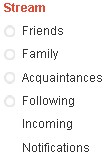
Google+ StreamSame as Facebook, You can share news, status updates, photos and video with your friends. In Google+, you are able to share to a certain someone you sort in a group called circle.  As you can see at the picture on the right, It is sort into Friends, Family, Acquaintances, following. Click on one of the stream and you can view all the posts by the circle and post stuff that only the certain circle can see. Google+ encourage privacy control to share something to someone you trust.


  • Circles 

In Facebook, everyone is your friends. You share your news to everyone, everyone can see your photos, video etc. Google+ encourage you to sort out your friends, family, acquaintance, following. Your friends are also be able to put in 2 circle. For example, if your brother is also your friend, you may add him to family and friend circle. So when you post something in your friends or family then he is able to see it. You can sort your people to circles in a fun drag and drop way. You can change which circle you would like your people to be in any time.


  • Hang outs 
Hang outs allow you to video chat with multiple people at the same time. All you have to do is install Google voice and video plugin and you are good to go. It is easy to get started and all you need is a webcam. Its amazing how good the quality of the sound and video is.
Google+ Hang out


  • sparks 
  Sparks is a feature that enable you to keep in touch on what is new in your field of interest. Let's say you add an interest to your spark "One Piece", you will receive the latest chapters, news, event about One Piece. Google sparks is like Google search but it provides you with the latest and quality content.

Google+ Spark
 This is the list of sparks I added in my Google+ account. So whenever I wanted to get the latest news from 'earn money blogging' , I will click on it to see what's new. Then, I found a very interesting post about 'how to really earn money blogging' I decided to share it with  my friends. All I have to do is click share and include which circle I would like to post to. Sharing is so simple!
Google+ spark news


  • Huddle
  Google+'s Huddle is a new way for your to stay in touch with your friends while you are on the go. It is kinda like Twitter, you can send message to a group of people or individual friend who are in Google+ Mobile. It doesn't have a web version so I can't screenshot for you. Take a look at Google Youtube video introducing Huddle.


In a nutshell

Google+ features 

  I give Google+ a 9/10. I heard that people said the Google Plus is "Facebook with no people". Well,  It is still new and under-development. It is still on invite only people, that means people who wants to join Google Plus can't join. Give Google+ a few month, I bet Google Plus will take down Facebook. Everyone will migrate to Google+ eventually.

Leave your comments below to share your thoughts about Google Plus. And if you want a Google Plus invite, I can spare some to you, just leave your e-mail below in the comment box.

Vagex - Increase your youtube view

Vagex It is IMPORTANT to increase your Youtube view in order to get ranked in Youtube. Posting videos on a crowded niche like 'Making money online' won't get your video to first page.


Now with Vagex, you can easily get ranked on first page in Youtube. How does it work?
vagex main page
This is how a vagex main page looks like

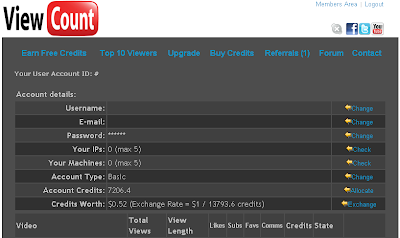
   You view other people's video on Youtube to earn 1 credit for each view or higher depending on the time set by the uploader. You can exchange the 1 credit for a view for your Youtube video. Vagex have a viewer that runs automatically, open it and leave it in your background and forget.


.
vagex download viewer or plugin
There are 2 ways to view Youtube video to earn credits. The first one is download add-on for you browser so that your browser view Youtube video automatically. The second one is download a viewer from Vagex and let it run in your background. I recommend the second way because it is faster and will not close if your internet connection disconnected for a short while.


Vagex adding a video to your Vagex accountBesides earn credit by viewing, you can also earn credit by auto-like, auto-subscribe, auto-favorite, and auto-comment. The same thing goes to your video, you can enable these feature for only 1 credit per likes, subscribe, favorite and comments. You are able to type in which is your main keyword to your video and Vagex will find your video using to search function on Youtube to increase your video ranking using the keyword provided.

Referral program is also available on Vagex, you can earn a portion of your referral's credit earn. So the more referral you have, the more view can be given to your Youtube video. If you don't have any video on youtube, you can use the credit to pay out to your paypal account. Exchange Rate = $1 / 13793.6 credits. The exchange rate may varies from time to time. The main thing Vagex is doing is to increase your video rank, if you want to use Vagex to earn money, it is up to you.

  Vagex has brought my video up to 2nd rank on Youtube using a specific keyword. I am very satisfied for the services provided by Vagex. I give him a 10/10

Click here to visit Vagex now!